Rusted Orlando: The Ultimate Vintage Font Set – Common Mistakes and How to Use It Right
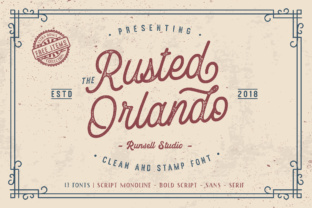
If you’ve come across Rusted Orlando, you already know it’s more than just a font. It’s a full-blown vintage design kit: monoline script, bold script, a clean sans, a classic serif, and then extras like ornaments, badges, and illustrations that bring an authentic old-time feel. But here’s the thing – many people jump into using a set like this without stopping to think about how to make it work for their specific project. And that’s where things can go sideways.
Whether you’re a small business owner creating a flyer, a freelancer designing a logo, or a blogger building a consistent visual identity, Rusted Orlando offers a tremendous amount of potential. But potential without a plan leads to wasted time, less impact, and sometimes a print or digital piece that feels more chaotic than charming. Let’s walk through the common mistakes, misunderstandings, and overlooked details that can trip you up – and, more importantly, how to steer clear of them.
1. Using Only One Font and Ignoring the Rest of the Set
Rusted Orlando isn’t a single typeface; it’s a curated collection. Yet one of the most frequent mistakes I see is someone grabbing only the bold script or the serif because it’s eye-catching, and never touching the rest. That’s like buying a full toolbox and only using the hammer. The set includes multiple styles that are designed to work together – a monoline script for a casual handwritten feel, a bold script for strong headlines, a sans for clean body copy, and a serif for a more traditional editorial look.
Why this hurts your design: You lose the visual variety that makes vintage design so compelling. A poster using only the bold script might look loud and hard to read, while a menu using just the serif could feel flat. The real magic happens when you combine them. For example, use the bold script for your main headline, the monoline for subheads or decorative accents, and the sans for readable body text.
Practical advice: Before you start, open the entire set and sketch out a hierarchy. Decide which element gets which style. If you’re designing a café logo, the monoline script could be the shop name, the bold script for a tagline, and an ornament from the bonuses as a subtle divider. Take a few minutes to mix and match – you’ll see the set come alive.
2. Overlooking Licensing Details – Especially for Commercial Work
I’ve seen freelancers and small business owners assume that because they bought a font set, they can use it anywhere – T-shirts, logos, product packaging, YouTube thumbnails, you name it. Rusted Orlando, like most premium font collections, comes with specific licensing terms. Some sets offer a basic license for personal use or a limited number of commercial projects, but not unlimited commercial use.
How this can cost you: Using a font without the correct license can lead to legal notices, additional fees, or having to redesign materials after they’re printed. A small business owner who uses Rusted Orlando on a product label without the proper commercial license might face an unexpected expense down the road.
What to check before buying: Look at the product page or readme file carefully. Is it a standard license? Extended license? Does it cover web use, app use, or merchandise? If you’re unsure, contact the seller. Many font creators are happy to clarify. Also, keep your receipt and a copy of the license terms in a folder for each project. It’s a small habit that saves big headaches.
3. Trying to Force a Vintage Look onto Every Modern Design
Rusted Orlando is gorgeous and authentic to old signage, posters, and labels. But that doesn’t mean every design needs to look like it’s from 1920. A common misunderstanding is thinking that using a vintage font automatically makes a project look “classic” or “trustworthy.” In reality, if you pair an ornate bold script with a chaotic background and no breathing room, the result can feel messy or hard to take seriously.
The real effect on communication: A wedding invitation might benefit from the warmth of Rusted Orlando’s serif and script combination. A tech startup’s landing page? Maybe not so much – unless you’re going for a retro, bespoke feel. The mistake is applying the style without considering the context. Your audience needs to read the message, not just admire the font.
Better approach: Balance the vintage elements with modern layout principles. Use plenty of white space. Limit your color palette to two or three tones – maybe a muted brown, cream, and dark navy. And let Rusted Orlando’s ornaments and badges do the heavy lifting for decoration instead of adding extra graphics. For a coffee shop menu, a small badge saying “Since 1998” in the bold script can add character without overwhelming the layout.
4. Neglecting Kerning and Spacing for Display Use
Many of the fonts in Rusted Orlando are designed for display – big headlines, logos, banners. But display fonts often need manual kerning adjustments because the default spacing might be too tight or loose, especially in larger sizes or all-caps settings. I’ve seen people drop the bold script into a header and leave the default tracking, only to end up with letters that nearly touch or look uneven.
Why this matters: In a logo or poster, poor kerning is immediately noticeable. It makes the piece look amateurish, even if the font itself is stunning. You lose the professional finish you paid for.
Practical fix: Always zoom in at 200% or more when working with display text in Rusted Orlando. Manually adjust the spacing between problem pairs – look for combinations like “WA,” “LY,” “To.” Most design software lets you adjust kerning by clicking between letters and using keyboard shortcuts (Alt + arrow keys in many programs). Also, pay attention to overall tracking; a slight increase often improves readability in titles.
5. Ignoring the Bonuses – The Illustrations, Ornaments, and Badges
Rusted Orlando comes with extras like vintage illustrations, ornaments, and badges. But many users treat them as an afterthought or don’t use them at all. That’s a missed opportunity. These bonuses are designed to complement the fonts and give your project a cohesive, handcrafted feel. Using them incorrectly, however, can also cause problems.
Common missteps: Placing an ornament exactly in the center of every line (creating a cluttered look), using a badge that’s too large in proportion to the text, or adding illustrations that distract from the core message. I’ve seen a flyer where a beautiful vintage badge took up half the page and the headline was pushed to the bottom – the hierarchy was gone.
How to use them effectively: Think of the bonuses as accents, not focal points. A small ornament between sections of a menu adds a nice touch. A badge next to a product name can highlight a special feature. Use them sparingly – one or two per design is usually enough. Also, scale them appropriately; they should support the typography, not compete with it. For example, in a poster for a craft fair, use a badge at the top corner with “Handmade” in the bold script, and a simple line ornament under the date in the monoline script.
6. Not Testing the Fonts Across Different Mediums
What looks perfect on your screen at 100% may not translate well to print or to a mobile screen. Rush to publish without testing, and you might end up with a font that’s too thin, too thick, or illegible at small sizes. Rusted Orlando’s script and serif fonts, while beautiful, have fine details that can get lost on low-resolution displays or in very small print.
How this affects results: A business card printed with the monoline script at 8pt might become an illegible scrawl. A logo used as a social media profile picture with the bold script might crush the details. The quality of your project suffers, and the recipient might not even know why it looks off.
What to do before finalizing: Create a test file. Print it at actual size if possible. View it on a phone, a tablet, and a large monitor. Adjust font size and weight. For digital use, consider adding a slight stroke or using the bold version if readability is an issue. If you’re designing for print, always do a proof print. Rusted Orlando is a premium set, but every font has its limitations – knowing them early saves rework.
7. Rushing the Selection – Not Comparing Against Your Brand’s Needs
Rusted Orlando is a fantastic tool, but it’s not the right fit for every project. A mistake I see a lot is falling in love with the aesthetic and forcing it into a brand identity that’s actually modern, minimalist, or corporate. The result is dissonance – the design feels like it’s from two different eras.
Better decision-making: Before you download or buy, ask: Does this set support the story I want to tell? If your brand is about rusticity, craftsmanship, history, or warmth, Rusted Orlando is likely a perfect match. If your brand is sleek and high-tech, you might only borrow one style for a specific accent – like using the sans for a retro-inspired subhead – rather than building the whole identity around it.
Advice: Create a simple mood board with your project’s goals and visual direction. Place Rusted Orlando’s sample text next to your other design elements (photos, colors, shapes). See if the combination feels intentional. Doing this before committing prevents costly redesigns later and helps you appreciate the set for what it does best: bringing a genuine, worn-in vintage feel.
Final Thoughts – Making Rusted Orlando Work for You
Rusted Orlando is an impressive collection that can elevate your projects to a whole new level of character and craftsmanship. But like any powerful tool, it demands thoughtful use. By avoiding these common mistakes – ignoring the range of fonts, neglecting licensing, misapplying the style, skipping kerning work, underusing the bonuses, failing to test, and rushing the brand fit – you set yourself up for designs that are not only beautiful but effective.
Take the time to explore the entire set. Experiment. Ask yourself what each font brings to the table. And remember that the vintage charm of Rusted Orlando shines brightest when paired with careful layout decisions. Your audience will notice the difference – and you’ll feel confident that you made the most of a truly impressive font set.