Rushk – A Practical Guide to Integrating This Dry Brush Display Font into Your Workflow
Choosing the right typeface can be as critical as selecting the correct tool for a job. It sets the tone, communicates values, and often determines whether a design lands or gets overlooked. Rushk is a display font that carves out a specific niche in this process. With its dry brush sans serif character, it brings a raw, relaxed energy that suits projects aiming for an unpolished, gritty aesthetic. This article explains what Rushk is, where it fits in a practical design workflow, and how you can integrate it smoothly into your own projects—whether you are a solo creator or part of a larger team.
What Rushk Brings to Your Design Process
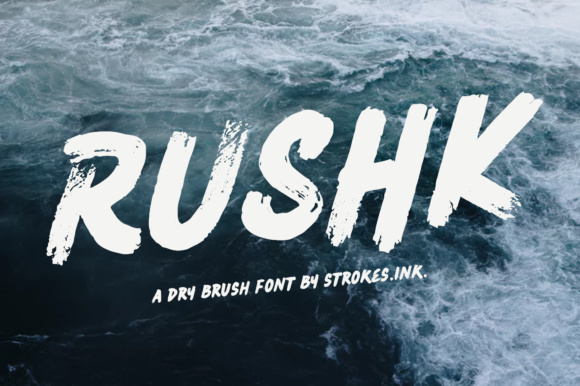
Rushk is not a universal workhorse font like a clean sans serif or a classic serif. Instead, it is a display typeface designed to make a statement. Its uneven strokes, dry brush texture, and slightly irregular letterforms mimic the look of hand-painted signage. This gives it a unique personality that works well for headlines, titles, and short bursts of text where a handcrafted, urban, or rebellious feel is needed. Think music festival posters, streetwear branding, coffee shop menus, or editorial spreads that need an edge.
From a practical standpoint, Rushk fits into a workflow as a specialty asset. It is not a font you use for body copy or lengthy paragraphs. Its strength lies in its ability to anchor a composition or provide contrast against cleaner elements. Understanding this distinction helps you plan where and when to deploy it effectively.
Planning Your Project Around Rushk
Integration starts before you open your design software. The decision to use Rushk should be deliberate, rooted in the project’s tone and target audience. If you are developing a brand identity for a craft brewery or a clothing line aimed at younger audiences, Rushk can communicate authenticity and grit. Conversely, it might clash with a corporate law firm’s refined image. Ask yourself: Does the project benefit from a relaxed, handcrafted feel? If yes, Rushk becomes a viable candidate.
Preparation involves testing compatibility early. Pull up the font in a mockup alongside your color palette and other design elements. Check how it reads at different sizes. Rushk shines at large point sizes, but at smaller scales, the texture may obscure legibility. Verify that the font license covers your intended use—commercial projects, web embedding, or print runs. This step prevents workflow interruptions later.
Using Rushk During the Creative Execution
Once you have committed to Rushk, the execution phase involves more than just typing text. Because it is a display font with distinct texture, you need to treat it as a visual element, not just a communication tool. Here are practical implementation tips:
- Pair with neutral fonts. Rushk’s irregularity works best when contrasted with a clean sans serif (like Helvetica or Open Sans) or a simple serif. This creates hierarchy and prevents visual overload.
- Adjust spacing manually. The dry brush effect can create uneven gaps between letters. Use your software’s tracking and kerning tools to fine-tune spacing, especially in headlines where close reading matters.
- Layer with textures. Because Rushk already mimics a brush effect, it pairs well with distressed backgrounds, paper textures, or overlays. Experiment with blending modes in Photoshop or Illustrator to enhance the gritty feel.
- Test color contrast. The font’s texture can get lost on busy backgrounds. Stick to solid, high-contrast color combinations—black on off-white, or white on dark, muted tones.
A typical workflow might involve importing Rushk into a Figma or Adobe XD project for a website header, then switching to Adobe InDesign for a print poster. Keep the font file organized in shared asset libraries if you work in a team. Consistency in file management saves time when editing or exporting final deliverables.
After Project Completion: Delivery and Quality Control
The font’s role does not end at the export button. When delivering files, consider how Rushk will render across different mediums. For web projects, convert text outlines into paths (using SVGs or PNGs) to preserve the brush texture, since web fonts may not render the texture exactly as intended. For print, provide high-resolution PDFs or outlines to avoid missing font issues on other systems.
Quality control involves checking the font at actual print size or on devices. Enlarging helps catch any characters that may break oddly due to the brush stroke. If the font has special ligatures or alternate characters, explore them—they can add variety to repeated usage across a campaign. Document your font choices in a style guide so that anyone picking up the project later knows how Rushk should be applied.
Integrating Rushk with Other Tools and Assets
Rushk interacts with your broader design ecosystem in several ways. If you use font management software like FontBase or Suitcase Fusion, add Rushk to a project-specific set. This keeps it accessible without cluttering your main library. For web designers, consider using a web font service that supports Rushk if you want live text; otherwise, use graphic replacements.
Collaboration becomes smoother when you share the font file and usage guidelines with your team. If you are a freelancer, include Rushk in your asset kit for recurring clients. Marketers and small business owners can reuse Rushk across social media graphics, email headers, and landing pages by creating a template with the font preset. This reduces decision fatigue and maintains consistency.
Educators and bloggers can use Rushk for course titles or blog post headers. Because it is a display font, it works well in limited-dose scenarios—like a single header per page. Overuse dilutes its impact.
Practical Implementation Tips for Long-Term Use
Managing a unique font like Rushk efficiently requires some organizational habits. Here are actionable strategies:
- Create templates. Build a few reusable layouts in your design software that incorporate Rushk for consistent branding. For example, a PowerPoint slide deck with Rushk headlines saves time for recurring presentations.
- Document style rules. Write down exact sizes, spacing, and color values where Rushk works best. Refer to this guide when handing off to other designers or revisiting old projects.
- Test across formats. Print a sample sheet with Rushk at sizes from 24pt to 96pt. Note where texture becomes distracting and where it looks perfect. Keep this reference near your desk.
- Backup your fonts. Rushk, like any downloaded font, should be stored on a cloud service or external drive. This protects your workflow if you change devices or reinstall software.
- Use version control. If you iterate on a design, label your files with version numbers. This helps when you need to revert to a previous layout where Rushk was used differently.
Real-World Workflow Examples
Consider three common scenarios where Rushk fits seamlessly:
- Branding for a local coffee shop. The shop wants a rustic, approachable logo. You select Rushk for the name, pair it with a clean sans serif for taglines, and apply it to to-go cups, menu boards, and social media posts. The workflow involves sketching the logo with Rushk, adjusting kerning for the distinct letterforms, then exporting vector files for print.
- Poster for a music festival. The theme is urban grit. Rushk appears in the headliner names. You layer it with concrete textures and high-contrast oranges. During production, you manually adjust tracking to emphasize the brush stroke, and at output, you convert to outlines to preserve the look across screen and print.
- Blog headers for a street culture magazine. Each article title uses Rushk at 60pt, with a dark background. The blog platform uses a custom CSS class for these headers. You create a template in the site builder, ensuring the font is embedded via @font-face or replaced with images for consistency.
These examples show how Rushk adapts to different stages: planning (selecting the right project), execution (pairing and layering), and delivery (prototyping formats). Each step benefits from treating Rushk as a design asset with specific constraints.
Factors to Consider for Quality and Efficiency
Rushk’s effectiveness depends on several practical factors. Readability is a primary concern—avoid using it for small body text or thin strokes. Its dry brush nature means some characters may wear differently at small sizes. Character set coverage matters if your project includes accented letters or special punctuation. Check the font supports the languages you need.
File types also influence workflow. OTF and TTF work for most desktop applications, while WOFF and WOFF2 are standard for web. If you are embedding Rushk on a website, test it in multiple browsers. The texture might render differently depending on the rendering engine. For critical headers, converting to SVG or PNG ensures pixel-perfect delivery.
Pairing with other resources extends Rushk’s utility. For example, a gritty background image from an asset library can complement the font’s brush look. But avoid matching textures too closely—Rushk should stand out, not disappear into the background.
Finally, consider the long-term use of Rushk in a brand. If the brand evolves in a cleaner direction, the font may feel out of place. Plan for that by using Rushk in campaign-specific materials rather than core logo elements that must endure. This flexibility protects your initial investment in font licensing and design time.
Rushk is a tool with a clear purpose. By understanding its strengths and limitations, you can integrate it into your workflow without friction. Whether you are a designer finalizing a poster, a marketer prepping social graphics, or a blogger setting up a new theme, treating Rushk as a deliberate choice—not an afterthought—makes every project tighter and more intentional. Plan its use, test its compatibility, and store it cleanly. That approach ensures Rushk enhances your work rather than complicating it.