Pie Fixes Everything
There are few statements that inspire universal nodding agreement, and Pie Fixes Everything is one of them. Whether you have just finished a complex project, are staring down a tight deadline, or simply need a moment of levity in your day, the sentiment resonates. This phrase has moved beyond a casual joke into a design asset that creators, small business owners, and entrepreneurs use across physical and digital products. The design, available in SVG, transparent PNG, EPS, and DXF formats, gives you the flexibility to apply it to kitchen signs, aprons, t-shirts, and more. But owning a design file is one thing. Knowing how to integrate it into your actual workflow is where the real value lies.
What the Pie Fixes Everything Design Actually Is
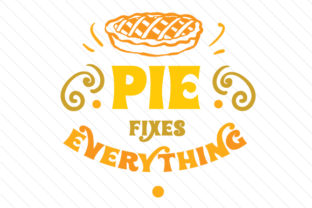
At its core, this is a graphic layout built around a playful, widely recognized quote. The design features a rendered pie at the top, paired with the text Pie fixes everything in a readable, market-ready arrangement. The files you receive are not a printed product; they are the source material you control. You get four formats, each serving a distinct purpose in a production pipeline:
- SVG – Scalable vector file for cutting machines, web graphics, and resizable print layouts.
- Transparent PNG – Raster image with a transparent background for mockups, social media, and quick previews.
- EPS – Industry-standard vector format for professional design software like Adobe Illustrator or CorelDRAW.
- DXF – CAD-adjacent vector format used by laser cutters, CNC routers, and some vinyl plotters.
This combination means you can take the same design from a digital mockup straight to a finished physical product without redrawing or reinterpreting the artwork. That continuity saves time and reduces error, especially if you are producing multiple items from one source file.
Where This Design Fits in a Broader Workflow
Every project has phases: planning, preparation, execution, and follow-through. The Pie Fixes Everything design can be introduced at almost any point, depending on what you are building. Let’s walk through where it lands naturally in different processes.
Before a Project: Setting the Tone
If you are launching a product line, building a brand around comfort-food humor, or planning a series of kitchen-themed items, the design works as a creative anchor. Before you cut vinyl or print a single shirt, use the SVG or EPS file to create mockups. Drop it onto a t-shirt template, a wooden sign mockup, or an apron preview. This lets you test scale, color placement, and audience reaction before committing materials. The transparent PNG is especially useful here because you can overlay it onto photographs of your actual products without background cleanup.
During this pre-production phase, you also decide on substrate compatibility. The DXF file is your friend if you plan to engrave or cut the design on a laser cutter. Check material thickness and kerf settings before you run the job. The vector formats let you resize without quality loss, so you can test the design at 4 inches for a small kitchen magnet and at 12 inches for a wall sign using the same file.
During Execution: Moving from File to Physical Product
When you are actively producing, the format choice dictates your tool path. For a vinyl cutter or plotter, import the SVG or DXF directly into your cutting software. Verify that the cut lines are closed and that the design is grouped appropriately. The Pie Fixes Everything design is self-contained, which means you do not need to spend time separating elements. If you are screen printing, use the EPS file to create separation layers. The solid shapes and clear typography handle color separation well, especially if you are running a single-color print on a light background.
For laser engraving on wood or acrylic, the DXF file is typically the most reliable. Set your power and speed settings based on the material, and run a small test cut on a scrap piece before committing to the final workpiece. Because the design includes both text and a graphic element, you may need to adjust vector thresholding so that fine details in the pie crust or lettering remain legible after engraving.
After Production: Quality Check and Variation
Once you have a finished product, compare it against the original PNG file. The transparent PNG serves as a visual reference that preserves the intended proportions, spacing, and alignment. If your physical output looks different, you can trace the discrepancy back to the settings used during cutting or printing. This closed-loop check—source file to physical product and back to digital reference—keeps quality consistent across production runs.
If you plan to offer variations (different colors, sizes, or substrates), the vector files let you create those variations from one master. Change the fill color of the SVG or EPS, adjust the overall size, and export new versions without redrawing anything. This is especially useful if you sell through multiple channels and need different file formats for each fulfillment method.
For Small Business Owners and Entrepreneurs
If you run a print-on-demand store, a small apparel brand, or a home decor shop, the four-format bundle removes the need to hire a designer every time you want to test a new product. Upload the transparent PNG to your POD platform for t-shirts, tote bags, or aprons. Use the SVG on platforms that accept vector uploads for higher quality prints. Because the design is quote-based, it pairs well with other food-themed or humor-driven products. You can bundle it with matching items—a dish towel, a mug, a cutting board—using the same artwork resized for each format. The consistency across products builds a cohesive mini-collection that customers recognize.
For Creators and Hobbyists
If you own a vinyl cutter, laser engraver, or 3D printer, the DXF and SVG files are the most direct path from idea to finished piece. One practical workflow: load the SVG into your design software, scale it to fit a pre-cut wooden blank, then export the toolpath. For a layered vinyl project, separate the text and the pie graphic into two colors. The design’s spacing supports this kind of split without causing registration issues. Even if you are just making gifts for friends and family, having the files ready to go means you can produce a batch in an evening rather than spending hours tracing a raster image.
For Educators and Workshop Leaders
Teaching a class on vector design, laser cutting, or print production? Use the Pie Fixes Everything files as a controlled example. Students can practice color separation, scaling, and format conversion without worrying about original artwork rights. The design is simple enough for beginners to manipulate but contains enough detail (the pie illustration, the curved text, the layout balance) to demonstrate intermediate techniques like path editing and layer management. You can also use the PNG as a reference image for a lesson on raster-to-vector tracing.
Compatibility and Preparation Tips
Before you open the files, confirm that your software or machine accepts the format you plan to use. Most modern design applications handle SVG and EPS without issue. DXF is more common in industrial and hobbyist CNC workflows. If your software does not import DXF directly, you can often open the SVG and export to a compatible format. The transparent PNG is the most universal option—it works in web browsers, office software, and basic image editors.
Preparation steps that save time later:
- Open the SVG in a vector editor and ungroup elements if you plan to recolor individual parts.
- Check the stroke width in the EPS file before sending to a plotter. Some EPS exports default to hairline strokes that may not cut correctly.
- For laser cutting, convert all text to outlines in the DXF to avoid font substitution issues on machines that do not read embedded fonts.
- Keep the transparent PNG as a reference layer in your design software. It helps you verify alignment when you rearrange elements.
Organizing Your Asset Library
If you work with multiple designs, creating a structured file system pays off over time. Store the four Pie Fixes Everything files together in a folder named by design name and date. Inside that folder, keep subfolders for production outputs: one for cut-ready files, one for print-ready PNGs, and one for source vectors you can still edit. When you revisit the design months later, you will know immediately which file to pull for a new project. This is especially helpful if you sell products across different platforms that require different file types.
Long-Term Use and Iteration
A design like Pie Fixes Everything does not get stale quickly because the humor is situational. You can re-release it seasonally with minor color changes—warm oranges and browns for fall, pastel accents for spring. The vector formats make global color changes trivial. If you own the files, you can also modify the text for special editions while keeping the pie illustration intact. Over time, you build a family of related products from one original artwork investment.
For entrepreneurs, this reduces creative overhead. You are not starting from scratch each season. For hobbyists, it means you can make coordinated gifts without repeating the same production steps from memory. The transparency of the PNG also means you can layer the design over photographs of baked goods or kitchen scenes for social media posts, reinforcing the joke in a visual context.
Observations on Usability and Consistency
The design’s strength is its directness. There is no hidden meaning, no complex illustration that requires explanation. That makes it suitable for a wide range of products because the audience self-selects. People who find it funny will buy it. People who do not will pass. This clarity also simplifies quality control. If the text is readable and the pie shape is recognizable from a distance, the design works. You do not need to agonize over tiny details that only matter at extreme close range.
Consistency across formats is another advantage. Because the files were created from the same source, the PNG preview matches the SVG outline matches the DXF cut path. That alignment is not guaranteed when you source artwork from different places or recreate it manually. You get a single source of truth that propagates through your entire production chain.
Making the Decision to Add It to Your Workflow
If you already produce physical goods or digital content around food, humor, or kitchen themes, the decision is straightforward. The design slots into existing processes with minimal friction. If you are just starting out, the four formats give you room to experiment without committing to one production method immediately. Try a small run of vinyl decals using the SVG, then a single t-shirt using the PNG, then an engraved cutting board using the DXF. Each test informs the next, and the files remain usable regardless of which direction you take.
The phrase itself has enduring appeal. It works as a gift, a personal statement, or a product hook. When you control the source files, you control how and where that appeal gets applied. Whether you are making one item for your own kitchen or a hundred for a retail display, the design stays consistent, scalable, and ready to use.