Assessing the Creative Business Card 2 Template: Is It the Right Fit for Your Branding Needs?
Choosing a business card template often means balancing design appeal against technical print requirements. Many templates look great on screen but fail to deliver when printed due to low resolution, improper color profiles, or missing bleed. The Creative Business Card 2 positions itself as a solution that addresses these practical concerns while maintaining a polished, modern aesthetic. For professionals researching their options, understanding what this specific template offers, and how it compares to other approaches, is key to making a confident decision.
This article provides a practical evaluation of the Creative Business Card 2, examining its strengths, limitations, and ideal use cases. By exploring how it fits into the broader landscape of business card creation—from full custom design to quick online tools—we aim to help you determine if it aligns with your project needs, technical skills, and branding goals.
What Makes the Creative Business Card 2 Distinct?
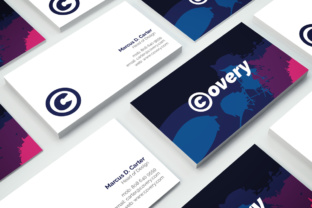
The Creative Business Card 2 is built around professional print production standards. It provides two separate PSD files for the front and back of the card, allowing for independent, detailed editing. The use of CMYK color mode and 300 DPI resolution directly addresses the most common pitfalls of DIY business cards: colors appearing dull or shifted after printing, and graphics looking pixelated. The inclusion of a 0.25-inch bleed is another critical feature, ensuring that background colors or images extend to the very edge of the trimmed card without leaving an unwanted white border. The template also specifies the use of the Exo font, creating a cohesive typographic style across all text elements and the logo placeholder, which simplifies font pairing decisions for the user.
What makes it distinct is the intended workflow. It is not a simple digital mockup or a fully locked template. It assumes the user will actively engage with the layered PSD environment to tailor the card to their specific brand. The design philosophy is clean and versatile, aiming to fit a wide range of modern, professional contexts rather than imposing a highly stylized or niche aesthetic. This deliberate neutrality, combined with robust print specifications, sets it apart from templates that prioritize visual flair over practical print readiness.
Versus Fully Custom Design Services
Hiring a professional designer provides a unique asset tailored to your brand strategy and market position, but it involves a significant investment in both time and budget. The Creative Business Card 2 offers a compelling middle ground. It provides a structurally sound, professionally formatted foundation that you can customize yourself. The tradeoff is working within the template’s established layout and visual hierarchy. If your brand requires a highly specific, unconventional shape or a complex illustrative background, a fully custom solution is likely necessary. However, for many established businesses or startups, the customization options within the layered PSD files—adjusting color swatches, editing type layers, and inserting a custom logo—offer sufficient flexibility to make the final card feel distinctly yours. The decision often comes down to whether you value unique strategic input from a designer or prefer direct control and cost efficiency.
Versus Online Drag-and-Drop Platforms
Online business card builders are popular for their convenience and low barrier to entry. They offer hundreds of templates and simple web-based editing tools that require no software installation. However, they frequently compromise on file ownership, resolution, and color control. You might only receive a low-resolution PNG or a PDF with limited editing capabilities for future updates. The Creative Business Card 2, by contrast, gives you full ownership of the master PSD files. If you are comfortable with Photoshop, the level of control over individual layers, CMYK color values, and text formatting is significantly higher than what most online tools permit. The tradeoff is a steeper learning curve and the need to manage the print setup process independently. For users who prioritize long-term brand consistency and precise color matching, the template approach offers greater fidelity and flexibility.
Versus Minimalist or Basic Template Options
Many free or inexpensive templates offer clean layouts but lack the deeper file structure—such as separate front and back files, properly named layers, and inclusion of bleed guides—that facilitate high-quality customization. The Creative Business Card 2 is designed for users who want a clean, uncluttered final product but still need the power to dive into the details. It assumes you want a professional card that looks refined without being overly decorative. A more basic template might suffice for a temporary role or a very low-stakes networking event, but the Creative Business Card 2 is built for those who view their business card as a deliberate, lasting branding tool requiring precise execution.
Strengths and Practical Tradeoffs
The primary strength of the Creative Business Card 2 lies in its rigorous adherence to print industry standards. The CMYK support and 300 DPI resolution are non-negotiable for professional offset or digital printing. The layered PSD structure allows for precise color matching, which is essential for maintaining brand consistency across all collateral. The clear focus on the Exo font also ensures that your final card has a coherent, modern typographic hierarchy without requiring you to make complex font pairing decisions or purchase additional typefaces. For someone who already works within the Adobe ecosystem, this template integrates seamlessly into their workflow, saving hours of setup time.
The tradeoffs are equally important to consider. The requirement for Photoshop or a compatible PSD editor is a clear barrier. Users without this software will need to acquire it, adding to the overall cost. Additionally, while the template offers substantial customization within its structure, its fundamental layout is fixed. If you have an unusually large amount of content, such as a long job title, multiple phone numbers, or several social media handles, you may find yourself fighting the template's spacing rather than working cohesively with it. Understanding these constraints upfront is essential. This template rewards technical skill and attention to detail, but it assumes those capabilities or the willingness to develop them.
Ideal Use Cases for the Creative Business Card 2
This template is particularly well-suited for several common professional scenarios:
- The Skilled Professional: A graphic designer, marketer, or entrepreneur who already uses Adobe Creative Suite will find the Creative Business Card 2 fits seamlessly into their existing workflow. They can open the PSD files, modify the smart objects for the logo, adjust the color swatches to match their brand palette, and send the final proof to a printer with complete confidence. For them, the template is an efficient starting point that eliminates rote setup work.
- The Brand-Conscious Startup: A small business that has defined its brand colors and typography but hasn't yet refined all its marketing collateral can use the Creative Business Card 2 to create a professional touchpoint quickly. The ability to precisely control CMYK values ensures the business card accurately reflects the chosen brand identity, building trust through consistency across digital and print mediums.
- The Event or Networking Focus: For a consultant or freelancer who needs a high-quality card for a specific conference or season of networking, this template provides a reliable, print-ready asset. The clean, neutral design ensures the card looks appropriate in diverse professional contexts, from formal boardroom meetings to casual industry mixers, without making a stylistic statement that might quickly become outdated.
When Another Option Might Serve You Better
While the Creative Business Card 2 is a strong tool for many, it is not universally ideal. Recognizing when an alternative approach is more appropriate can save you time and frustration.
If you do not own graphic design software and have no plans to purchase or learn it, a web-based business card builder offers a more accessible path, despite the tradeoffs in file ownership and advanced editing capability. Similarly, if your branding requires a non-standard card size, a unique die-cut shape, or a highly illustrative background that breaks away from a clean, grid-based layout, a custom designer or a specialized niche template will be more effective.
Extreme budget constraints also present a limitation. While the Creative Business Card 2 is a cost-effective alternative to hiring a designer, it still represents an investment. Freely available basic templates exist, but they require careful vetting of their print specs and licensing terms. The value of this template lies in its professional-grade technical setup, which eliminates guesswork and reduces the risk of costly reprints due to color or bleed errors. If your budget is absolutely zero, a free template may be your only option, but you must be prepared to handle potential technical gaps yourself.
Key Decision Factors for Your Evaluation
When deciding if the Creative Business Card 2 is right for your project, consider the following practical criteria:
- Software Proficiency: Do you have access to a PSD editor like Photoshop, and are you comfortable working with layers, adjusting type, and understanding color modes? A strong yes suggests a good fit. If not, factor in the time for learning or the cost of software.
- Print Knowledge: Are you familiar with terms like bleed, trim line, and CMYK? The template provides a professional framework, but you need to communicate these specs correctly to your printer or understand them in your printer's interface.
- Brand Alignment: Does the clean, modern aesthetic of the Exo font and the template's balanced layout match your brand personality? If your brand is highly traditional or deliberately avant-garde and disruptive, this template may feel mismatched.
- Content Volume: Does your information fit comfortably within a standard 3.5” x 2” layout? If you have many credentials, contact methods, or social links, consider whether the template's structure accommodates them without appearing cluttered.
- Desired Control Level: Do you want full ownership of the master file for future edits, or is a single print run sufficient? The template's value increases significantly if you plan to reuse and adapt the design over time.
The Creative Business Card 2 represents a practical intersection of thoughtful design and rigorous print production standards. It empowers users who have some technical ability to achieve professional, custom-looking results without the investment of a dedicated designer. By focusing on the critical technical details—CMYK, DPI, bleed, and layered file organization—it elevates the standard template offering into a functional tool for serious branding. As you weigh your options, consider how its specific strengths align with your own skills, workflow, and project goals. For the right user, it provides a reliable, efficient path to a polished and professional business card that performs exactly as intended when it matters most.